核心功能Core Features
FunCross 是芳景生物自研的果蝇杂交方案生成器。只需输入亲本品系基因型或编号,即可自动推演 P0–F3 各代杂交组合,输出可视化杂交图与可执行实验步骤。无论您是要平衡维持 founder 品系、合并两个元件到同一条染色体,还是做染色体背景纯化,FunCross 都能在 1 分钟内给出方案。FunCross is a Drosophila crossing-scheme generator built by Fungene. Enter your parental stock genotype or stock number — FunCross derives P0–F3 generations automatically and outputs a visual cross diagram plus ready-to-run experimental steps. Whether you need to maintain a balanced founder, combine two elements on one chromosome, or clean up a chromosomal background, FunCross delivers a complete scheme in under a minute.
FunCross 围绕「任务参数 + 基因型输入 + 杂交图渲染 + Protocol 输出」四大模块,覆盖 5 类常见Drosophila杂交场景。FunCross is built around four core modules — task parameters, genotype input, cross diagram rendering, and protocol output — and covers five common Drosophila crossing scenarios.
5 大任务类型5 Task Types
- 建系 (stock):单品系 founder → 平衡维持或纯合稳定系。Stock: single-stock founder → balanced maintenance or homozygous stable line.
- 重组 (recombine):将两个元件重组到同一条染色体。Recombine: bring two elements onto the same chromosome.
- 多基因组装 (assemble):合并两条染色体上的不同元件(X+2 / X+3 / 2+3)。Assemble: combine elements from different chromosomes (X+2 / X+3 / 2+3).
- 染色体替换 (replace):整条染色体等基因化 / 背景纯化(用平衡子跟踪)。Replace: whole-chromosome isogenization / background cleanup (tracked with balancers).
- 位点导入 (introgression):仅导入目标位点,靠雌性**减数分裂**交换削掉侧翼连锁供体片段。Introgression: import only the target locus; rely on **meiotic** recombination in females to shed linked donor flanks.
4 大 UI 区域4 UI Areas
- 任务参数面板(左栏顶部):选择任务类型 / 染色体 / 回交代数 / 致死假设。Task parameters panel (top-left): pick task type / chromosome / backcross generation / lethality assumption.
- 基因型输入卡(左栏中部):3 种来源(BDSC / FlyBase / VDRC)+ 个体/品系模式 + 实时预览与置信度。Genotype input card (mid-left): three sources (BDSC / FlyBase / VDRC) + individual/stock mode + live preview and confidence.
- 杂交图画布(中栏):自动布局 P0–F3 各代节点 + 缩放 / 平移 + 节点 tooltip。Cross diagram canvas (center): auto-layout P0–F3 nodes + zoom / pan + node tooltips.
- 方案概览 + Protocol(右栏):预计世代、**预计周期(周)**、警告框、分步步骤、一键复制 Protocol、保存 PDF。Plan overview + Protocol (right): estimated generations, **estimated duration (weeks)**, warnings, step-by-step protocol, one-click copy, save PDF.
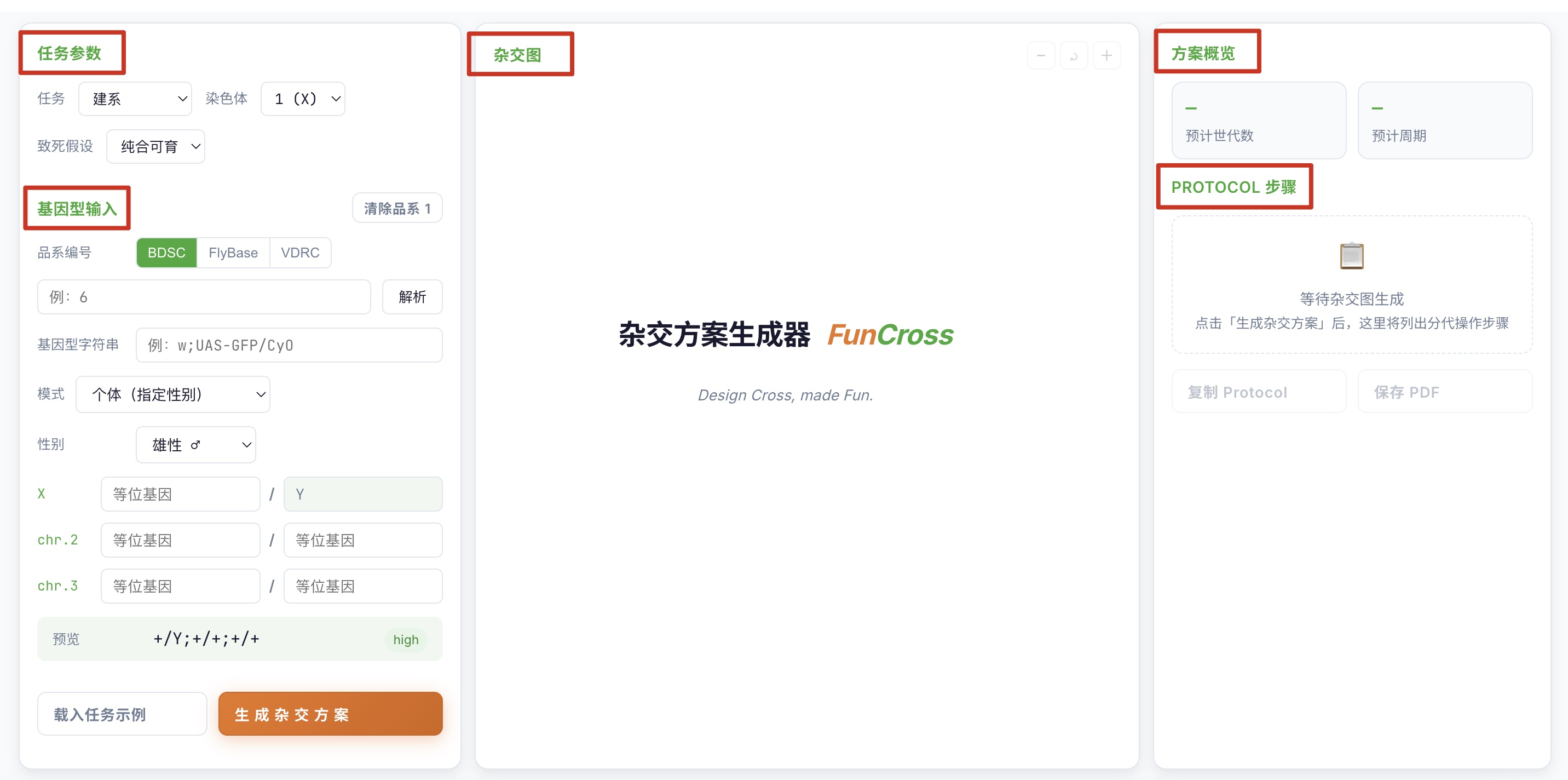
提示:不确定怎么开始?点击参数面板里的「载入任务示例」按钮,自动按当前任务填好示意基因型,点「生成杂交方案」即可看效果。Tip: Not sure how to start? Click "Load task example" in the parameters panel to auto-fill a sample genotype for the current task, then click "Generate Cross Plan" to see the result.
使用步骤Usage Steps (9 Steps)
9 步完成一份杂交方案。每步聚焦一个动作,建议从第 1 步顺序往下走。Build a complete cross scheme in 9 steps. Each step focuses on one action — work through them in order, starting from step 1.
1 选择任务类型Choose the task type
在左栏顶部「任务」下拉里挑一个:Open the "Task" dropdown at the top of the left panel and pick one:
- 单品系维护或纯合 → 建系 (stock)Single-stock maintenance or homozygotes → Stock
- 两元件放同一染色体 → 重组 (recombine)Two elements on the same chromosome → Recombine
- 两染色体元件合并 → 多基因组装 (assemble)Elements from different chromosomes combined → Assemble
- 背景纯化 / 染色体替换 → 染色体替换 (replace)Background cleanup / chromosome replacement → Replace
- 只导入目标位点 → 位点导入 (introgression)Import only the target locus → Introgression
提示:不确定?点「载入任务示例」自动按当前任务填好示意基因型。Tip: Not sure which task? Click "Load task example" to auto-fill a sample genotype for the current task.
2 选择染色体 / 组装类型 / 回交代数Choose chromosome / assembly type / backcross generation
任务确定后,下方联动控件会切换:Once the task is chosen, the linked controls below update:
- 单染色体任务:选「染色体」
1 (X)/2/3Single-chromosome tasks: pick the "Chromosome"1 (X)/2/3 - 多基因组装任务:选「组装类型」
X+2/X+3/2+3Assemble tasks: pick the "Assembly type"X+2/X+3/2+3 - 染色体替换 / 位点导入任务:还要选「回交代数」(默认 5,最高 10)Replace / introgression tasks: also pick "Backcross generation" (default 5, max 10)
- X 染色体 + 建系任务:多一个「致死假设」下拉(纯合可育 / 雌性致死 / 雄性致死 / 雌雄致死)X-chromosome + Stock tasks: an extra "Lethality assumption" dropdown appears (viable / female-lethal / male-lethal / lethal in both sexes)
3 输入品系 1 基因型Enter stock 1 genotype
每张「基因型输入卡」支持 3 种输入方式:Each "Genotype input card" supports three input methods:
- 方式 A — 品系编号:选 BDSC / FlyBase / VDRC 来源,输入
6或FBst0000006或v10004,按 Enter 或点「解析」自动载入完整基因型。Method A — Stock number: pick a source (BDSC / FlyBase / VDRC), enter6orFBst0000006orv10004, then press Enter or click "Resolve" to auto-load the full genotype. - 方式 B — 直接写基因型字符串:在「基因型字符串」框粘贴 FlyBase compact 串,例如
w[1118]; Tg1/CyO; +/+,实时显示预览与置信度。Method B — Type a genotype string: paste a FlyBase compact string into the "Genotype string" box, for examplew[1118]; Tg1/CyO; +/+. A live preview and confidence score update in real time. - 方式 C — 逐条染色体手填:在 X / 2 / 3 各两行 homolog A / homolog B 手填元件符号。Method C — Manual per chromosome: under X / 2 / 3, fill in the two rows (homolog A / homolog B) with element symbols by hand.
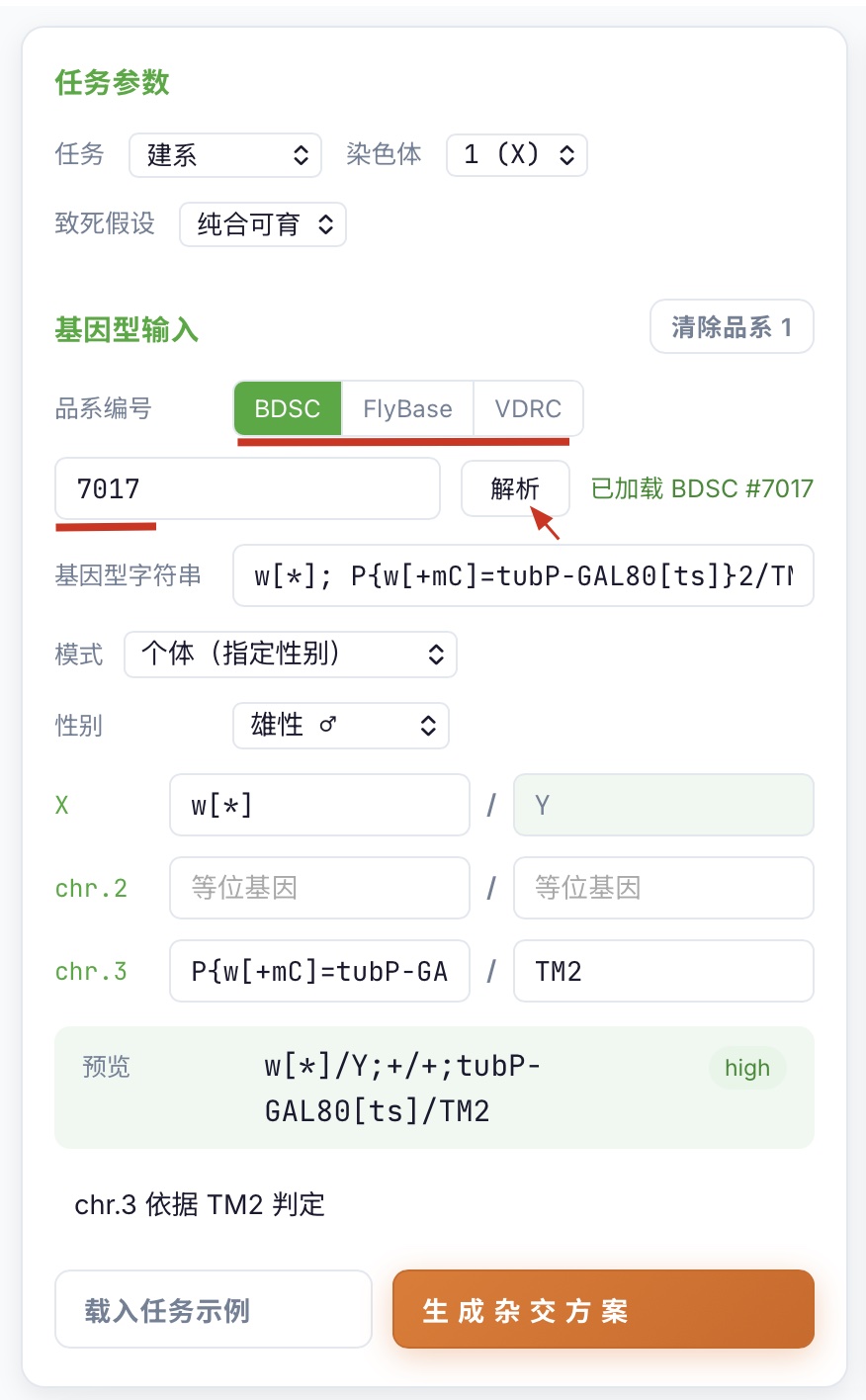
6 + Enter 后完整基因型自动回填到预览区
[TODO image] Mode A — BDSC source tab selected + 6 typed + Enter triggers auto-resolve backfill into the preview
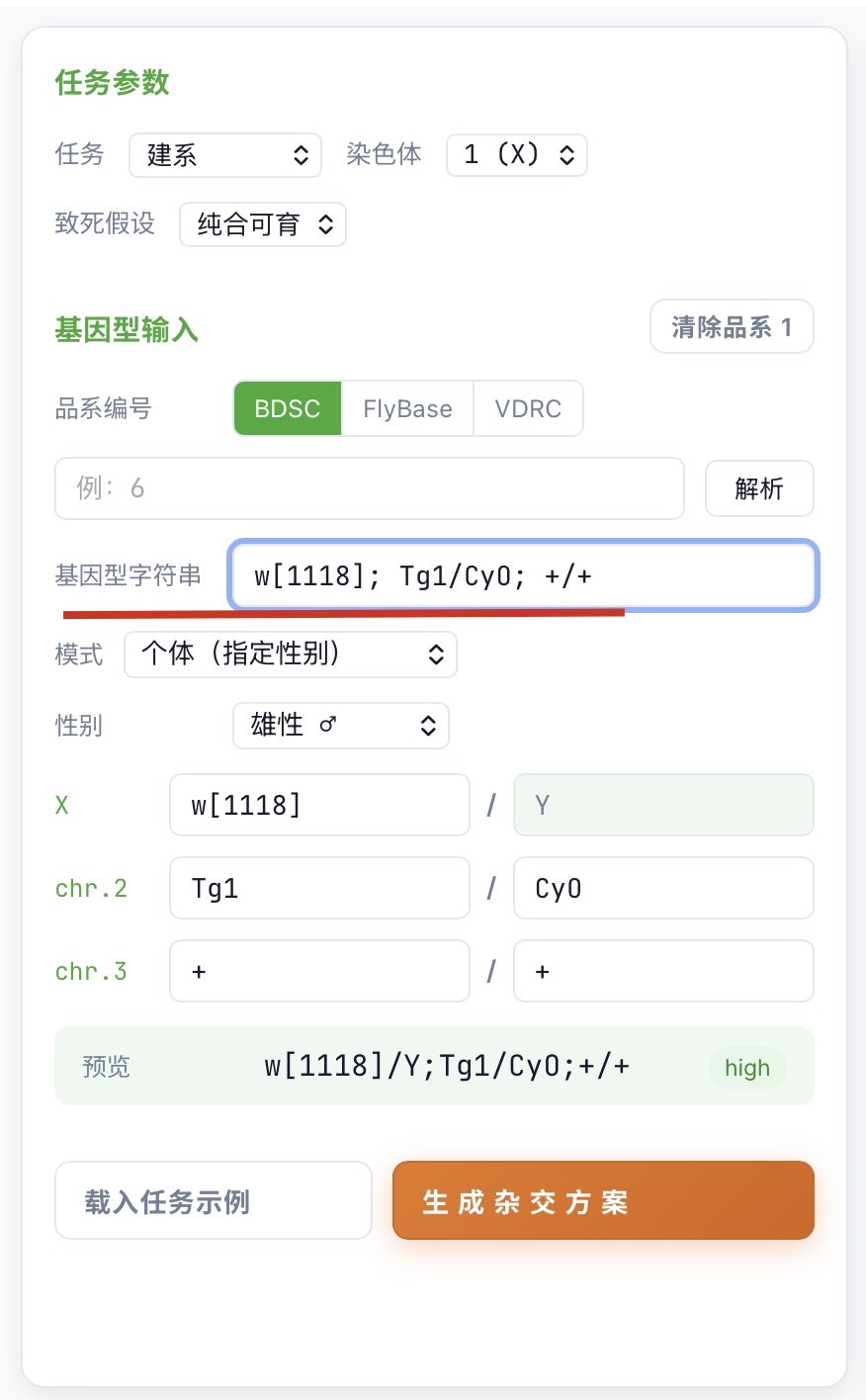
w[1118]; Tg1/CyO; +/+ + 下方实时显示预览与置信度
[TODO image] Mode B — paste w[1118]; Tg1/CyO; +/+ into the "Genotype string" box + live preview + confidence score below
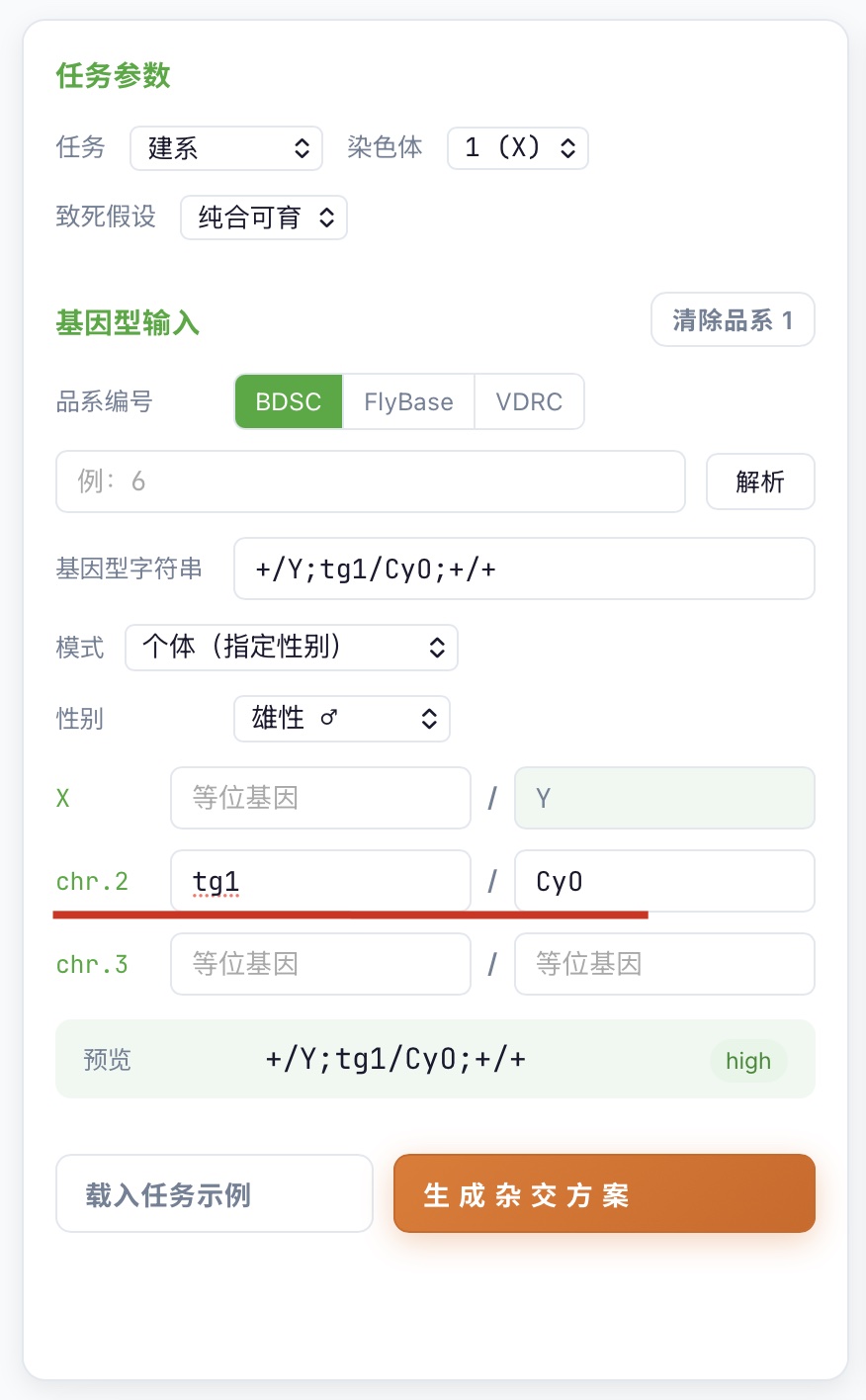
提示:「个体模式」可指定性别(♀ / ♂ / 未指定),雄性 X 第二同源自动锁 Y。「品系模式」会自动推导 ♀/♂ 形态并标红致死 / 不育错误。Tip: "Individual mode" lets you set the sex (♀ / ♂ / unspecified). For a male, the second X homolog is locked to Y automatically. "Stock mode" auto-derives ♀/♂ forms and flags lethality / sterility errors in red.
4 输入品系 2 基因型(双品系任务)Enter stock 2 genotype (two-stock tasks)
重组 / 组装任务需要填两张卡。品系 1 作 ♀ 亲本,品系 2 作 ♂ 亲本。Recombine / assemble tasks need both cards. Stock 1 acts as the ♀-parent, stock 2 as the ♂-parent.
- 双品系任务在参数面板选完后,页面会自动展开「品系 2」输入卡。After the task is set to a two-stock task in the parameters panel, the "Stock 2" input card expands automatically.
- 若只需要单亲本(如建系 / 染色体替换任务的母本侧),「品系 2」保持空白即可。If only one parental stock is needed (for example, the ♀-parent side of a Stock or Replace task), leave "Stock 2" blank.
5 设置致死 / 不育Set lethality / sterility
recombine / assemble / replace / introgression 任务会在模式行露出「致死 / 不育」下拉,按元件所在染色体自动切换 4 态(X)或 2 态(常染色体)。For recombine / assemble / replace / introgression tasks, a "Lethality / Sterility" dropdown appears on the mode row. It offers four states for X-linked elements and two states for autosomes.
提示:致死 / 不育走任务参数,不走基因型注释。引擎按 params.viabilityA / viabilityB 决定 F1–F3 的存活分支。Tip: Lethality / sterility lives in task parameters, not in the genotype string. The engine uses params.viabilityA / viabilityB to determine which F1–F3 branches survive.
6 生成杂交方案Generate the crossing scheme
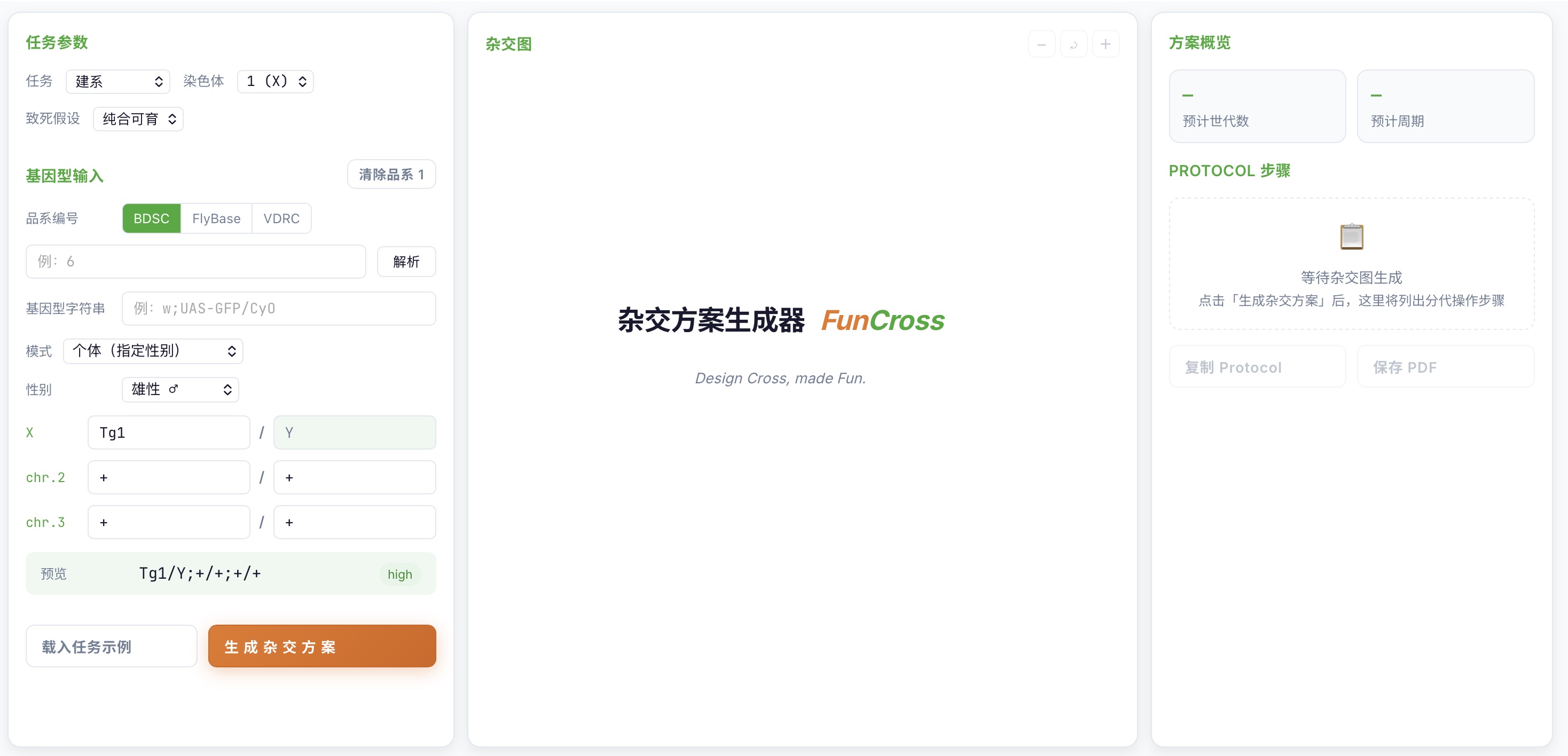
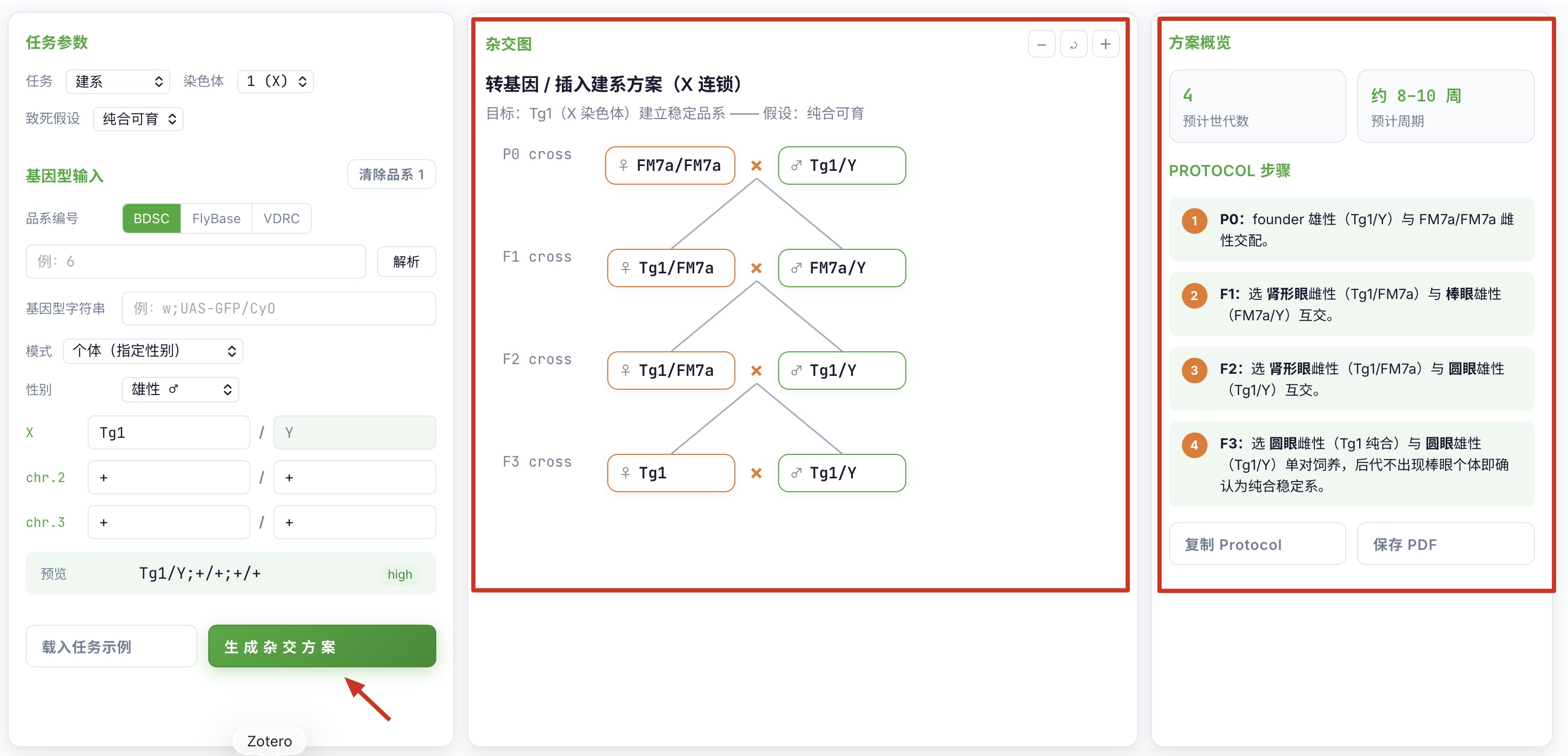
点左栏底部「生成杂交方案」按钮:Click the "Generate Cross Plan" button at the bottom of the left panel:
- 按钮颜色由橙变绿表示参数变更。The button turns from gray to orange (
is-dirty) whenever parameters change. - 中栏立即渲染分代杂交图(节点 + × 连线 + tooltip)。The center column immediately renders the per-generation cross diagram (nodes + × connectors + tooltips).
- 右栏出现预计世代数、**预计周期(周)**、警告框(如有)和分步 Protocol。The right column shows estimated generations, **estimated duration (weeks)**, the warning panel (if any), and the step-by-step Protocol.
7 检查警告与调整Review warnings and adjust
右栏警告框里有红线提示时(例如「回交对象必须是受体背景平衡系」「平衡子断点覆盖不足」),优先采纳。When the warning panel on the right shows red messages (for example, "Backcross partner must be a recipient-background balanced stock" or "Balancer breakpoints do not cover the region"), treat them as authoritative.
- 拖动画布平移、用
− / ⤾ / +缩放看清结构。Drag the canvas to pan; use− / ⤾ / +to zoom in or out. - 修改任何输入后按钮变橙,再次点「生成杂交方案」刷新。Any input change turns the button orange — click "Generate Cross Plan" again to refresh.
8 复制 ProtocolCopy the Protocol
点右栏「复制 Protocol」按钮:Click the "Copy Protocol" button on the right:
- 分步操作被复制成纯文本(
步骤1: …)到剪贴板。The step-by-step actions are copied to the clipboard as plain text (Step 1: …). - 粘贴到实验记录本(电子或纸质)即可执行。Paste them into a lab notebook (digital or paper) to run the experiment.
9 导出 / 切换语言 / 清空重来Export / switch language / start over
- 保存 PDF:点右栏「保存 PDF」调用浏览器打印对话框,选「另存为 PDF」(
@media print已隐藏按钮与滚动条)。Save PDF: click "Save PDF" on the right to open the browser print dialog, then choose "Save as PDF" (@media printhides buttons and scrollbars). - 切换语言:顶部「中 / EN」切换 i18n;nav 文案切换,已有 canvas 不被覆盖。Switch language: use the "中 / EN" toggle at the top to switch i18n. Nav labels translate, but the rendered canvas is preserved.
- 清空重来:「清除品系 1 / 清除品系 2 / 全部清除」一键清空该侧的基因型与致死/不育下拉(回到「可育」默认),并清空画布、协议、警告与统计;保留模式、性别与来源选择。画布被清空后,需再次点击「生成杂交方案」才会重画。Clear and restart: "Clear Stock 1 / Clear Stock 2 / Clear All" wipes the genotype and lethality/sterility dropdowns on that side (defaulting back to "viable"), and clears the canvas, protocol, warnings, and stats. Mode, sex, and source are preserved. After clearing the canvas, click "Generate Cross Plan" again to redraw.
维持系形态自动识别(X / 2 / 3 号染色体)Maintenance-stock auto-detection (X / chr2 / chr3)
FlyCross Designer 内置形态启发式(INF-A 规则),能在你输入基因型后立即识别「挂在致死平衡子上的元件」形态,把「致死 / 不育」下拉自动调到正确档位,并在警告框里说明依据。FlyCross Designer ships with a shape-based heuristic (INF-A) that immediately recognises "insert over a lethal balancer" shapes when you finish entering a genotype. The "Viability / Sterility" dropdown is auto-set to the right value, and the warn-box carries the rationale.
触发条件Trigger
当一条染色体的两条同源上有跨同源(trans)配对——一边是非野生型元件,另一边是该染色体的致死平衡子——形态识别即触发。The heuristic fires when a chromosome's two homologs carry a trans (across-homolog) pair: one homolog carries a non-wild-type allele, the other carries that chromosome's lethal balancer.
FM7a / FM7c (FM7 系列)(FM7 series)Tg1/FM7a、P{GAL4}/FM7cbothLethal)CyO / TM3 / TM6B / TM2 / Sp / ScoTg1/CyO、w[*]/CyO、UAS-GFP/Splethal)TM3 / TM6B / TM2Tg1/TM6B、GAL4/TM2lethal)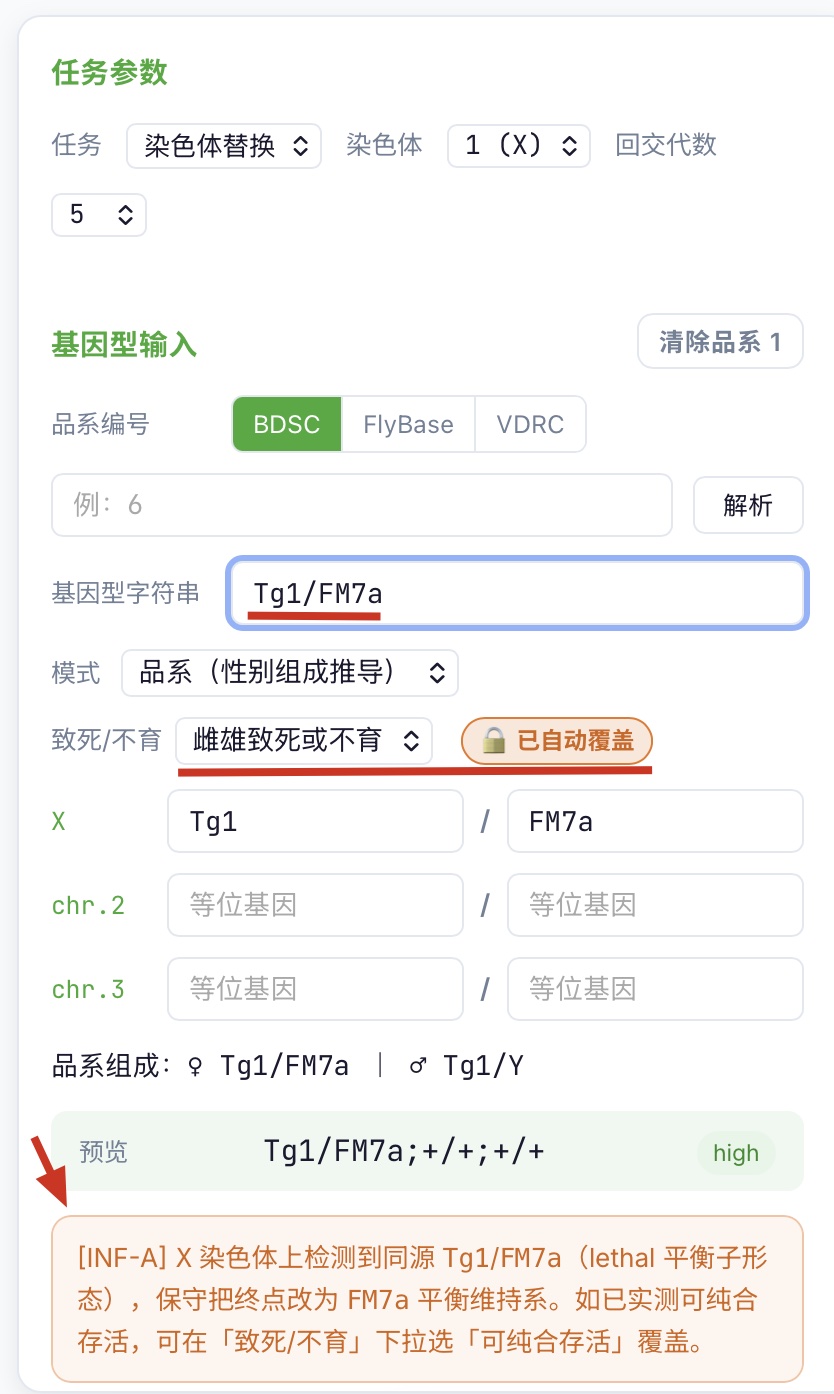
Tg1/FM7a(或 P{GAL4}/FM7c)后,致死 / 不育下拉自动跳到「雌雄致死或不育」并显示 🔒 已自动覆盖 pill。
X maintenance shape — X-chromosome input card with Tg1/FM7a (or P{GAL4}/FM7c): "Viability / Sterility" dropdown auto-jumps to "both-sex lethal / sterile" with 🔒 auto-overridden pill.
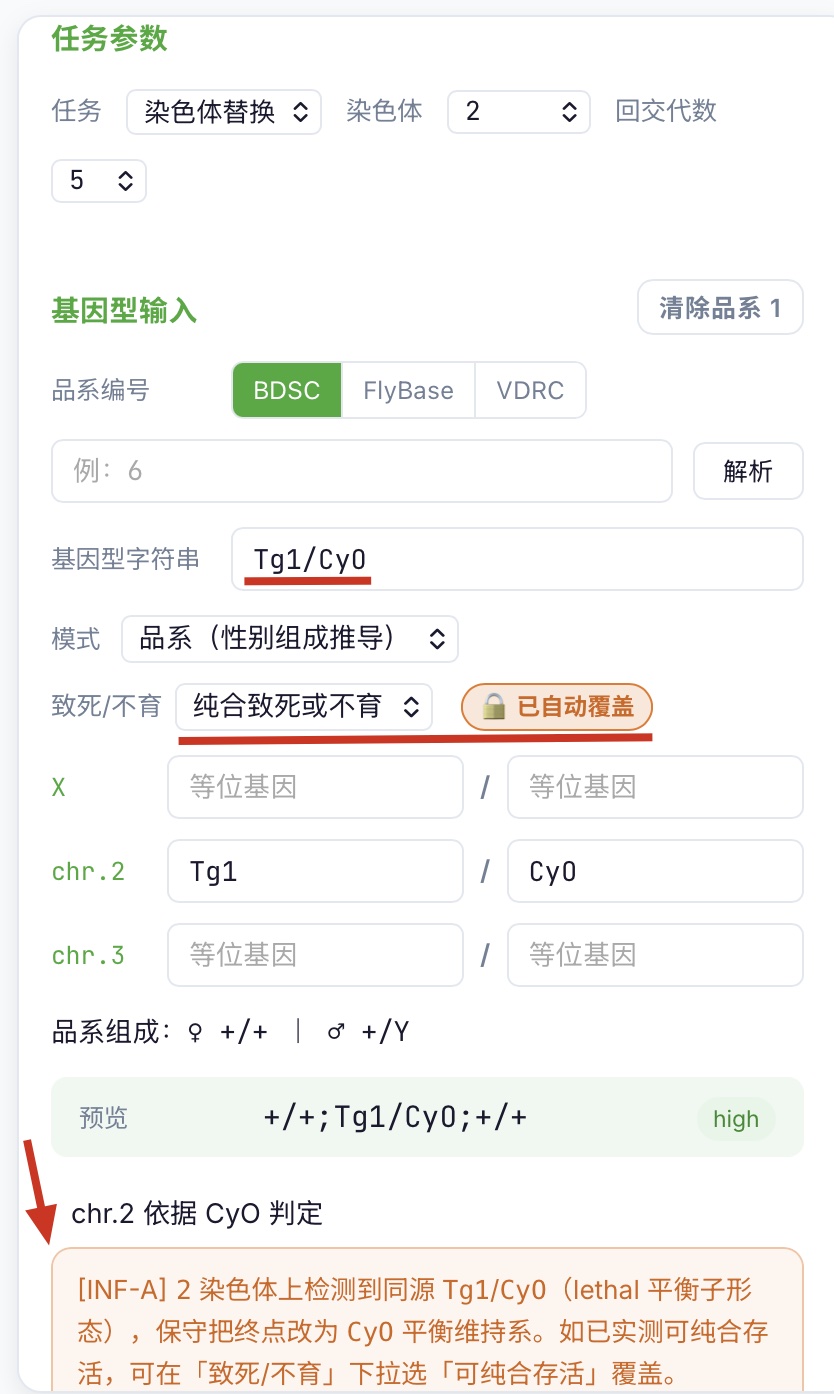
Tg1/CyO(或 w[*]/CyO / UAS-GFP/Sp)后,致死下拉自动跳到「纯合致死或不育」,警告框出现 [INF-A] 红色标签 + 具体说明。
chr2 maintenance shape — chr2 input card with Tg1/CyO (or w[*]/CyO / UAS-GFP/Sp): viability dropdown auto-jumps to "homozygous lethal / sterile", warn-box shows [INF-A] red tag + concrete explanation.
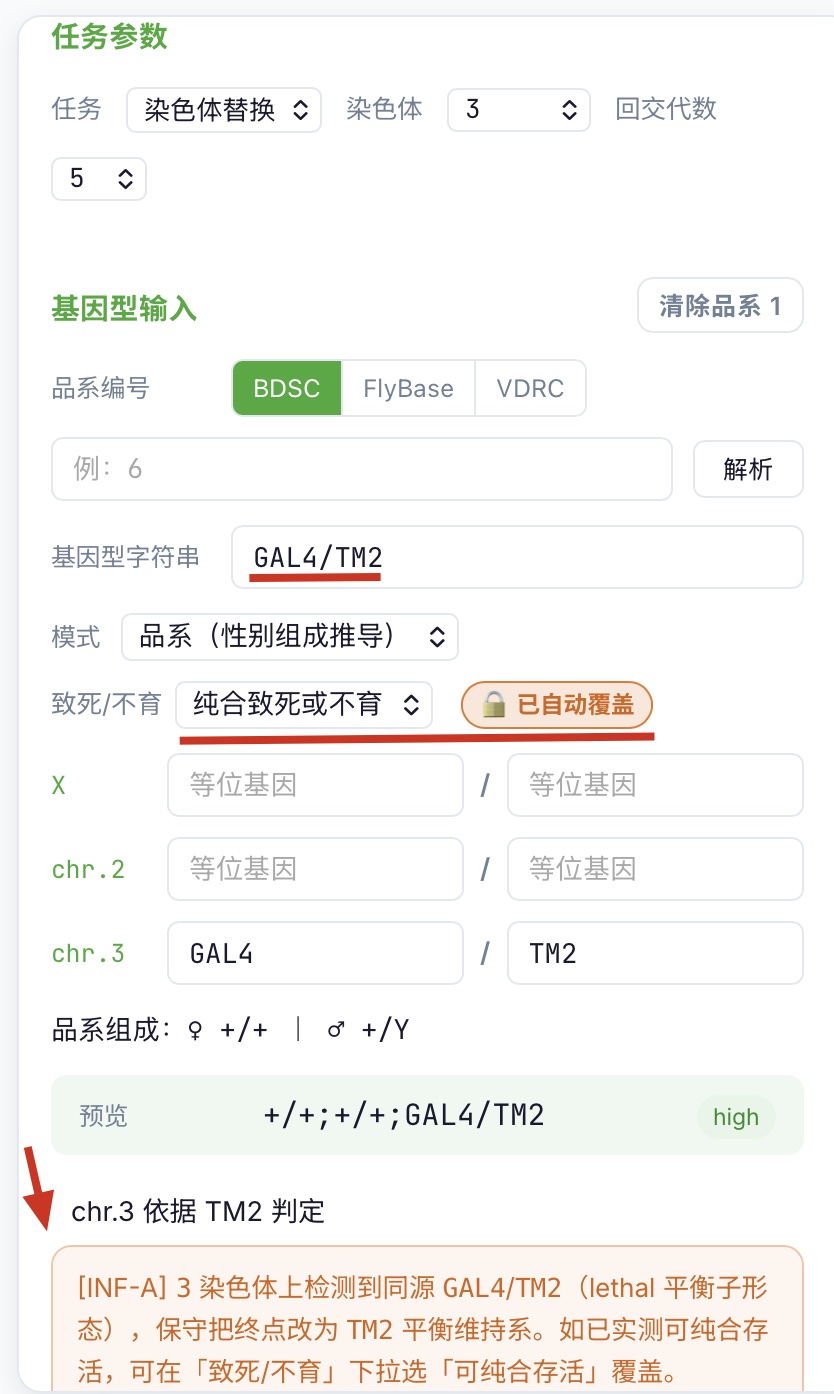
Tg1/TM6B(或 GAL4/TM2)后,致死下拉自动跳到「纯合致死或不育」,警告框出现 [INF-A] 标签。
chr3 maintenance shape — chr3 input card with Tg1/TM6B (or GAL4/TM2): viability dropdown auto-jumps to "homozygous lethal / sterile", warn-box shows [INF-A] tag.
X 与常染色体的差别Why X differs from autosomes
- 常染色体:平衡子(如
CyO)自身纯合致死,所以「挂CyO」就等于「建不了纯合系」——维持系形态是直接证据。Autosome: balancers such asCyOare homozygous-lethal on their own, so "carryingCyO" already means "you can't make a homozygous line" — the maintenance shape is direct evidence. - X 染色体:
FM7a/FM7c自身纯合雌可活可育,致死性来自被平衡的那条 X。所以识别依据反过来:「能纯合就不必挂平衡子,挂了就是信号」——元件挂在 FM7 上本身就说明被平衡的 X 有问题。X chromosome:FM7a/FM7care homozygous-viable-and-fertile in females; the lethality comes from the X they balance. The detection rule inverts: "if it can be homozygous, there's no need for a balancer — so carrying one is the signal" — anything placed over FM7 indicates that the balanced X is the problem. - 因此 X 命中后状态取最保守的
bothLethal(无法仅从形态区分雌致死 / 雄致死)。That's why the X result is the most conservativebothLethal— shape alone can't distinguish female- vs male-lethal.
- 自动覆盖:识别命中后,左栏「致死 / 不育」下拉自动跳到对应档位,旁边显示 🔒 已自动覆盖 提示。Auto-override: on hit, the "Viability / Sterility" dropdown on the left panel jumps to the right value with a 🔒 auto-overridden pill.
- 警告文案:警告框中给出
[INF-A]标签与具体说明,例如:Warn-box text: a[INF-A]tag and a concrete explanation, e.g.- 常染色体:Autosome:
2 号染色体上检测到同源 Tg1/CyO(lethal 平衡子形态),保守把终点改为 CyO 平衡维持系。chr2 detected trans-pair Tg1/CyO (lethal-balancer shape); endpoint forced to a CyO-balanced maintenance line. - X:X:
X 染色体上检测到同源 Tg1/FM7a(FM7 平衡维持形态),保守把终点改为 FM7a 平衡维持系,并按雌雄均受影响处理。X detected trans-pair Tg1/FM7a (FM7 maintenance shape); endpoint forced to an FM7a-balanced line and treated as both-sex affected.
- 常染色体:Autosome:
- 用户覆盖权:手动把下拉改回「雌雄可育」会被识别为「用户已确认」,此时 INF-A 事件仍 emit 但不再覆盖参数——避免启发式与你的实测经验冲突。User override: setting the dropdown back to "viable" is recorded as "user-confirmed"; the INF-A event still fires but no longer overwrites params — your empirical judgement wins.
不触发的几种情况When the heuristic does NOT fire
- cis 配对(同一同源上同时带元件与平衡子),例如
y[1] w[1118] FM7a/Y(雄性单条 X 上 cis 携带 y[1], w[1118], FM7a):FM7a 雄性半合子天然可活,不判维持系。cis pairing (both insert and balancer on the same homolog), e.g.y[1] w[1118] FM7a/Y— a male carrying y[1], w[1118] and FM7a cis on a single X. FM7a hemizygous males are viable, so this is not a maintenance shape. - 纯合形态,例如
Tg1/Tg1:不是「挂在平衡子上」的形态,不触发。Homozygous shape, e.g.Tg1/Tg1— not "over a balancer", so no trigger. - 雄性半合子,例如
Tg1/Y:另一同源是野生型且无平衡子,不触发。Male hemizygous, e.g.Tg1/Y— the other homolog is wild-type and carries no balancer, so no trigger. - 用户手敲未走解析(个体模式下无 BDSC/FlyBase/VDRC/example 来源标记):闸门关闭,跳过启发式——避免覆盖你正在手敲的中间态。User-typed without resolution (individual mode, no BDSC / FlyBase / VDRC / example source tag): the gate stays closed, heuristic is skipped — so it doesn't clobber an in-progress typing state.
关闭方式:How to disable: 形态识别是默认开启的。如需关闭,在「载入任务示例」后手动选回「雌雄可育」即可;闸门以槽位(A / B)独立记录你的覆盖决定,不会被其他输入改动冲掉。The heuristic is on by default. To turn it off for a slot, set that slot's dropdown back to "viable" after loading — the gate remembers your override per slot (A / B) and isn't reset by other input edits.
常见问题FAQ
按使用流程分组,覆盖输入、引擎、画布、回交四大常见踩坑点。Grouped by workflow stage: input, engine, canvas, backcross — the four most common stumbling points.
大小写规范与自动补全Case sensitivity & autocomplete
FlyCross 默认按 FlyBase / BDSC 规范大小写解析基因型(TM6B、CyO、GAL4)。小写或混写也能识别——解析层会自动归一化,无需用户死记硬背。FlyCross parses genotypes using FlyBase / BDSC canonical case (TM6B, CyO, GAL4). Lowercase or mixed-case also works — the parser layer normalises automatically; you don't have to memorise case.
- 实时提示:输入
tm6b、cyo、gal4时,下方会弹出候选(如TM6B、CyO、GAL4),按 ↑/↓ 选中、Enter/Tab 确认。直接忽略候选也无所谓,解析层会兜底。Live suggestions: when you typetm6b,cyo,gal4, a dropdown shows canonical candidates (e.g.TM6B,CyO,GAL4). Use ↑/↓ to navigate, Enter/Tab to confirm. You can ignore the dropdown entirely — the parser still resolves it.
w[1118]、y[1])、P{…} / Mi{…} / PBac{…} 构造、用户自定义的 construct 名(如 UAS-GFP、Act5C-GAL4)保持原样。这些是 FlyBase / BDSC 的大小写敏感场景。Tokens we never rewrite: square-bracket contents (w[1118], y[1]), P{…} / Mi{…} / PBac{…} constructs, and user-defined construct names (e.g. UAS-GFP, Act5C-GAL4). These are FlyBase / BDSC case-sensitive by convention.TM6是真实存在的独立平衡子,不会被自动映射为TM6B。TM6is a real, separate balancer — it is never auto-mapped toTM6B.gal4/Gal4视为GAL4(BDSC 默认规范写法大写)。gal4/Gal4are treated asGAL4(BDSC's canonical spelling is uppercase).FM7/FM7b由用户填规范名(研究习惯问题,不自动补)。FM7/FM7bare filled in by the user (research-habit nuance; not auto-completed).
Q1 输入裸编号「6」是哪个库的品系?Which stock library does the bare number "6" come from?
默认走 BDSC。前缀 v 或 VDRC_ 走 VDRC;FBst… 或 FlyBase_ 走 FlyBase。例如 v10004 自动识别为 VDRC v10004。By default, BDSC is used. A v or VDRC_ prefix routes to VDRC; FBst… or FlyBase_ routes to FlyBase. For example, v10004 is auto-recognized as VDRC v10004.
Q2 在「品系编号」输入框按 Enter 会发生什么?What happens when I press Enter in the "Stock number" input?
等价于点「解析」按钮,立即调 /api/stock-lookup 拉取完整基因型并写回。Equivalent to clicking the "Resolve" button — it calls /api/stock-lookup immediately, fetches the full genotype, and writes it back.
Q3 雄性 X 的第二同源会自动锁 Y 吗?Does the second X homolog auto-lock to Y for males?
是。选个体模式 + 雄性时,X 第二同源框变灰自动写 Y;切回雌性自动重置 +,避免无效基因型。Yes. In individual mode with male selected, the second X homolog field is grayed out and auto-filled with Y. Switching back to female auto-resets it to +, avoiding invalid genotypes.
Q4 同染色体的两个元件怎么办?How do I handle two elements on the same chromosome?
assemble 任务会自动拒绝并提示 sameChromosomeWarning,请切到「重组 (recombine)」任务先合并到同一条染色体。Assemble tasks auto-reject with a sameChromosomeWarning. Switch to the "Recombine" task to merge the two elements onto a single chromosome first.
Q5 雄性致死或不育的 X 重组能设计吗?Can I design an X recombination with a male-lethal or male-sterile stock?
能。引擎会自动切到「♀ 亲本 = 致死品系」+「FM7a 保护」路径,Protocol 提示「重组染色体在 FM7a 保护下不再发生交换」。Yes. The engine auto-switches to the "♀-parent = lethal stock" + "FM7a protection" path, and the Protocol notes "the recombinant chromosome no longer recombines under FM7a protection."
Q6 杂交图上看不到致死个体是 bug 吗?Is it a bug that lethal individuals are missing from the cross diagram?
不是。画布只画活下来的个体(engine/PLAN_PROTOCOL.md 规则 Q7)。致死类按设计意图不出现在图上。Not a bug. The canvas only draws individuals that survive (per engine/PLAN_PROTOCOL.md rule Q7). Lethal classes are excluded by design.
Q7 节点上显示的是完整基因型吗?Does a node show the full genotype?
不是。节点显示简化名(剥 P{…} 行号),例如 P{w[+mC]=Act5C-GAL4}25F01 在 canvas 上显示为 Act5C-GAL4。悬停节点 tooltip 显示 full 全基因型 + 表型提示。No. Nodes show simplified names (with P{…} line numbers stripped). For example, P{w[+mC]=Act5C-GAL4}25F01 displays as Act5C-GAL4. Hover over a node to see the full genotype plus phenotype hints in the tooltip.
Q8 画布能缩放吗?Can the canvas be zoomed?
可以。右上角 − / ⤾ / + 三个按钮,缩放范围 0.4× ~ 2×。按住背景左键可拖动平移。Yes. Three buttons in the top-right — − / ⤾ / + — zoom from 0.4× to 2×. Hold the left mouse button on the background to pan.
Q9 保存 PDF 是导出图片吗?Does "Save PDF" export an image?
当前实现是触发浏览器打印对话框(window.print(),@media print 隐藏按钮与滚动条),选「另存为 PDF」即可。后续会换 html2pdf / jsPDF + html2canvas。Currently, it triggers the browser print dialog (window.print() with @media print hiding buttons and scrollbars) — pick "Save as PDF". A future version will switch to html2pdf or jsPDF + html2canvas.
Q10 染色体替换的回交对象有什么要求?What are the requirements for the backcross partner in chromosome replacement?
必须用「受体背景平衡系」(如 Sp/CyO 或 TM2/TM6B 品系雌性),不是普通 w[1118] 受体。警告框会自动提示。You must use a "recipient-background balanced stock" (for example, Sp/CyO or TM2/TM6B females), not a plain w[1118] recipient. The warning panel flags this automatically.
Q11 位点导入任务为什么禁用平衡子?Why are balancers disabled for introgression tasks?
平衡子会抑制交换,让侧翼供体片段无法削掉。平衡子只在终点(如目标位点为纯合致死时)才引入。Balancers suppress recombination, so they prevent the flanking donor segments from being shed. Balancers are introduced only at the final step — for example, when the target locus is homozygous lethal.
Q12 回交 N 代后受体背景占比怎么算?How is recipient-background fraction calculated after N backcross generations?
公式 (2^i − 1) / 2^i(i = 回交代数)。回交 5 代 → 受体背景 ≥ 31/32(≈ 96.9%);回交 10 代 → ≥ 1023/1024(≈ 99.9%)。画布会显示「回交 N 代后受体背景 ≥xx/xx」。The formula is (2^i − 1) / 2^i (i = backcross generation). After 5 generations, recipient background ≥ 31/32 (≈ 96.9%); after 10, ≥ 1023/1024 (≈ 99.9%). The canvas shows "After N backcross generations, recipient background ≥ xx/xx."
Q13 输入「Tg1/FM7a」后致死 / 不育被自动改成「雌雄致死或不育」,是 bug 吗?I typed "Tg1/FM7a" and the Viability dropdown was auto-set to "both-sex lethal / sterile" — is this a bug?
不是。这是「维持系形态自动识别」(INF-A 规则)命中:X 上 FM7a 是平衡维持形态——元件挂在 FM7a 上就说明被平衡的 X 携带致死 / 不育突变,引擎保守按最严的 bothLethal 处理。如已实测雌雄可育,可在「致死 / 不育」下拉手动改回「雌雄可育」,该选择会被记为「用户已确认」并保留。No. The "maintenance-stock auto-detection" (INF-A) just fired: FM7a on X is a balancer-maintenance shape — anything over FM7a indicates the balanced X carries a lethal / sterile allele, and the engine conservatively forces bothLethal. If you've empirically validated viability, set the dropdown back to "viable" — that gets recorded as "user-confirmed" and sticks.
Q14 建系任务选了「2 号染色体」但解析出基因型在「3 号」,画布上方弹橙色横幅,是 bug 吗?Stock task: I picked "chr 2" but the parsed genotype sits on "chr 3" — an orange banner pops above the canvas. Is this a bug?
![[真实截图] Q14 橙色引擎异常横幅 - 建系任务染色体错位示例](images/tasks/7-1.jpg)
#engine-error-banner(⚠ 引擎异常:品系的 2 号染色体上未找到插入元件)+ 右栏 Protocol 显示「生成失败,请检查输入或联系开发者」
[Real screenshot] Q14 orange error-banner example — Stock task + "chr 2" parameter + parsed chr 3 genotype: orange #engine-error-banner below the canvas toolbar and above the canvas root (⚠ Engine error: No insert found on chromosome 2 of this stock) + right-pane Protocol shows "Generation failed, please check inputs or contact the developer"
不是。这是建系任务的新校验——引擎会比对「参数面板选的染色体」与「品系基因型实际所在染色体」是否一致;如果对不上,引擎直接 throw,并在画布工具栏(缩放按钮行)之下、画布根节点之上弹出橙色横幅 #engine-error-banner(前缀 ⚠ 引擎异常: + 错误消息,例如 品系的 2 号染色体上未找到插入元件)。同时右栏 Protocol 显示「生成失败,请检查输入或联系开发者」。No. Stock now validates that the chromosome you selected in the parameter panel matches the chromosome the parsed genotype actually lives on. If they disagree, the engine throws and the UI renders an orange #engine-error-banner just below the canvas toolbar (the row with the zoom buttons) and above the canvas root — prefix ⚠ Engine error: + the error message (e.g. No insert found on chromosome 2 of this stock). The right-pane Protocol simultaneously shows "Generation failed, please check inputs or contact the developer."
常见原因:Common causes:
- BDSC / FlyBase / VDRC 解析出的完整基因型里,插入元件实际所在染色体与你在参数面板选的不一致(例如选「2 号」,但 BDSC #7018 解析出的是「3 号 tubP-GAL80[ts]」)。The chromosome the insert actually sits on in the resolved BDSC / FlyBase / VDRC genotype doesn't match the chromosome you picked in the parameter panel (e.g. you picked "chr 2", but BDSC #7018 resolves to "chr 3 tubP-GAL80[ts]").
- 手敲基因型时漏写了 semicolon 分隔,导致整段串被分到错误的染色体槽位。Manual genotype entry is missing a semicolon separator, so the whole string lands in the wrong chromosome slot.
处理:把参数面板的「染色体」下拉改到与解析结果一致的那一条,再点「生成杂交方案」即可。如果你的本意就是「另一条染色体」,请重新核对品系是否选错——建系任务只支持单条染色体上的插入元件。Fix: change the parameter panel's "Chromosome" dropdown to match the resolved genotype, then click "Generate cross plan" again. If you genuinely meant the other chromosome, double-check whether you picked the wrong strain — Stock tasks only support an insert on a single chromosome.